 SkillBamboo

You don't need a bigger GPU to run a fast local coding agent on Qwen 3.8 27B. You need better settings: a tuned engine, a working chat template and sane cache on the RTX 3090 you already have. Agent choking on its first tool call? Crawling once the conversation gets long? Don't blame the card.
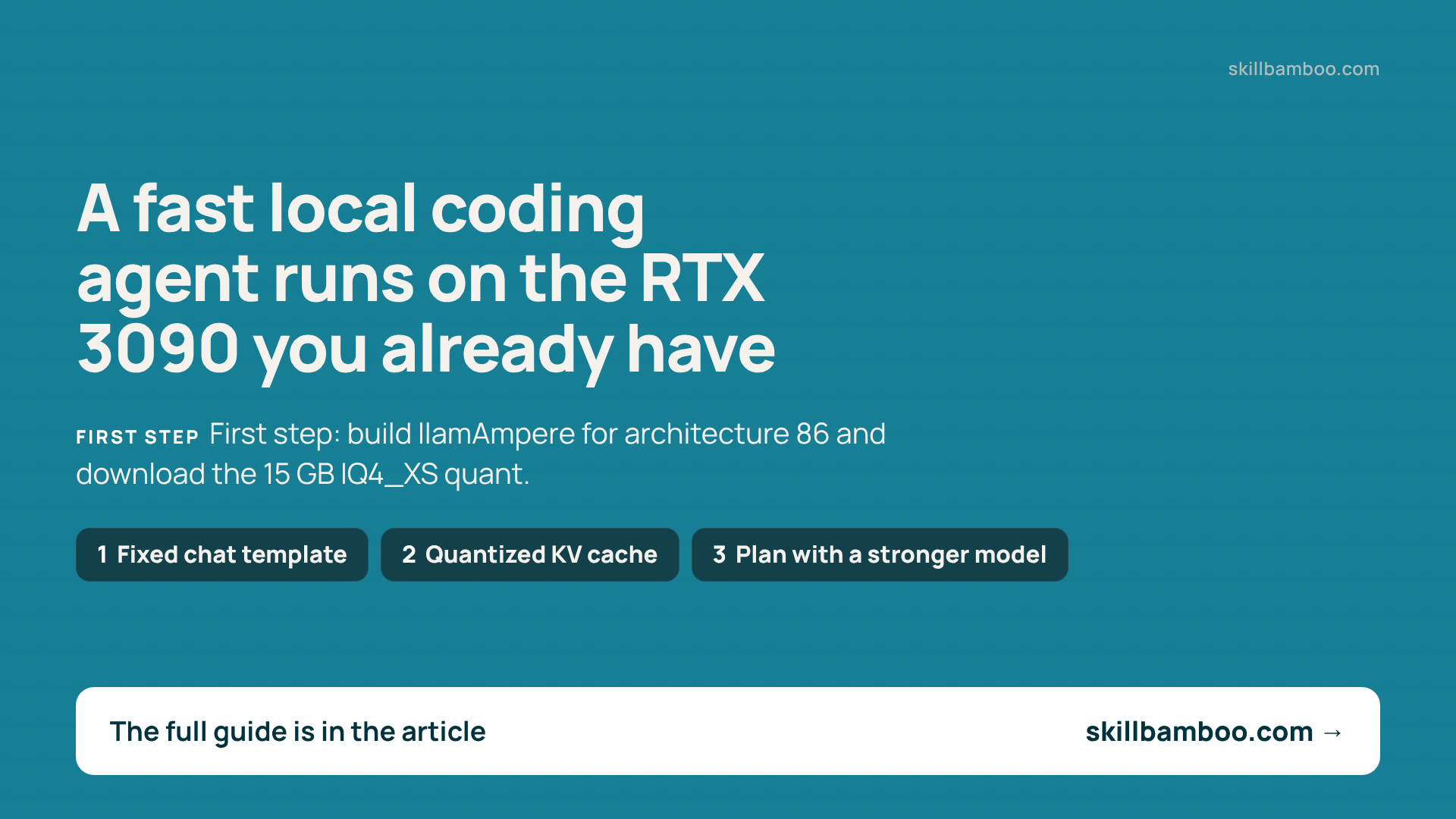
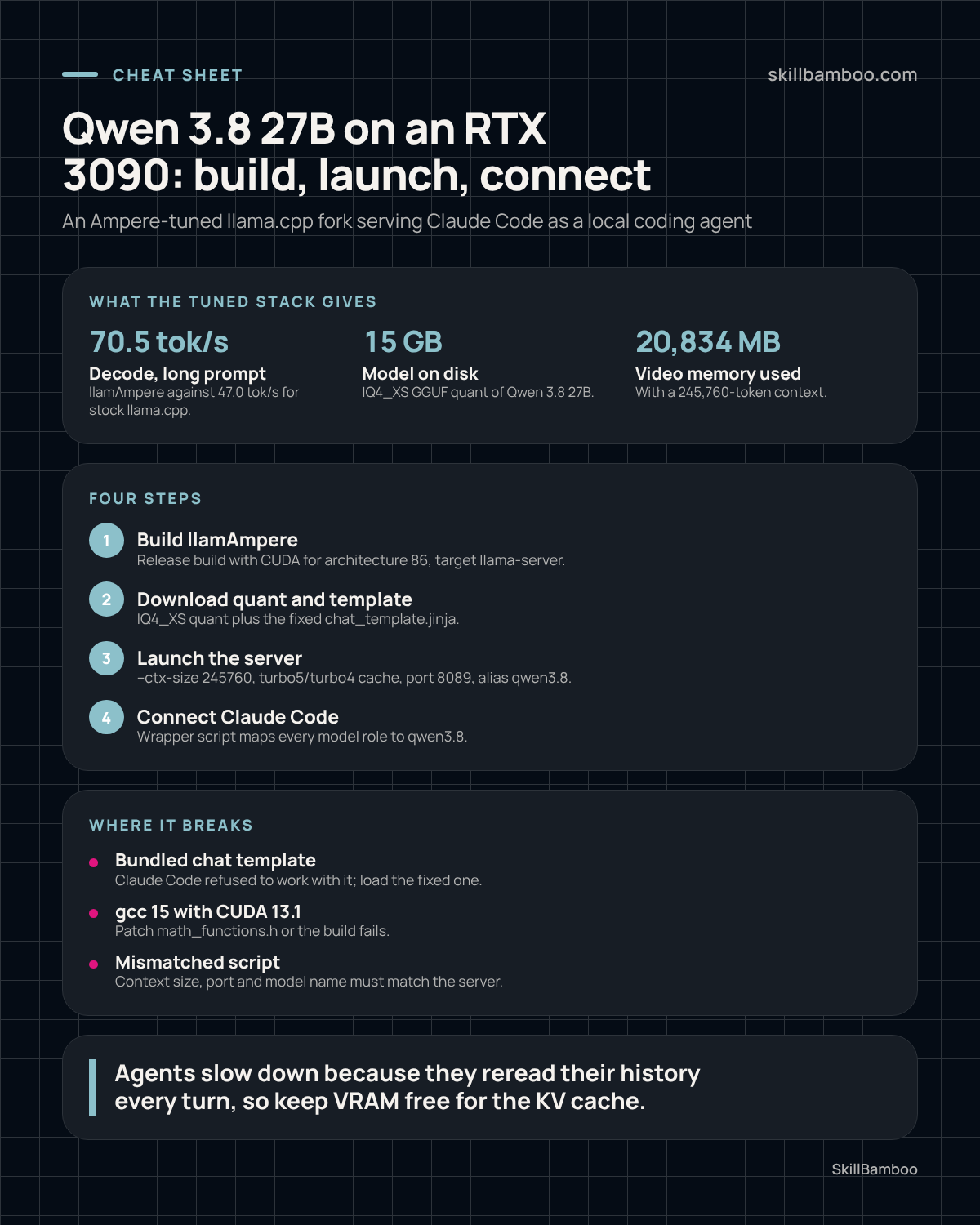
So here's the stack, step by step: an Ampere-optimized llama.cpp fork, a 4-bit quant, a fixed chat template and a quantized KV cache. By the end you'll have a working local coding agent with a 245K context, decoding at about 79 tok/s on short prompts (roughly 69 tok/s end to end). You'll also see why agent turns slow down, and what caching actually does about it.
What a tuned stack gets you on one RTX 3090
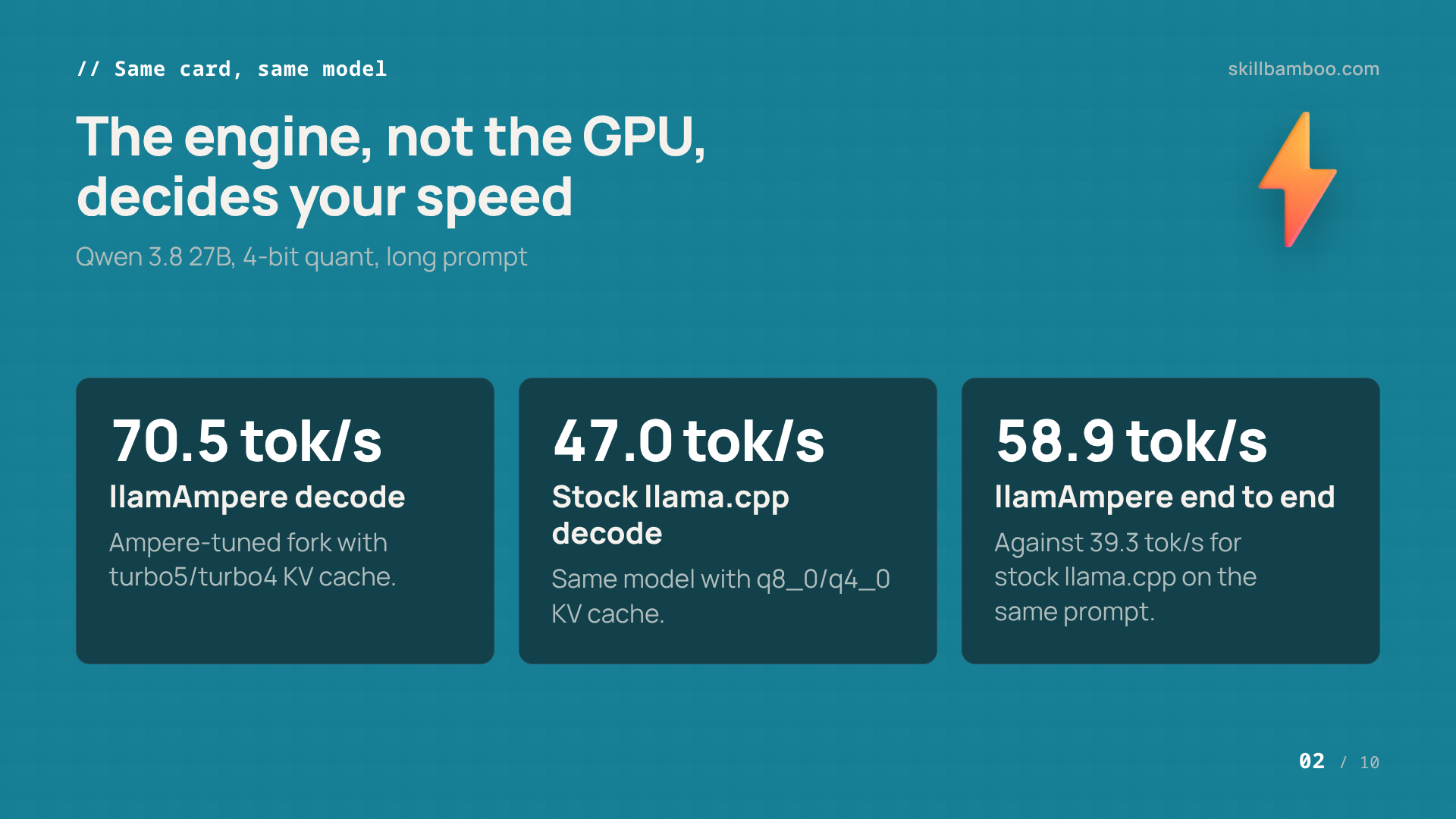
The engine here is llamAmpere, a fork of llama.cpp tuned for NVIDIA's Ampere generation, the family the RTX 3090 belongs to. Same card, same model, different engine and cache settings – and on long prompts the gap is large.
JakeATX/llamAmpere – GitHub – llama.cpp fork tuned for RTX 3090 (Ampere)
| Setup (Qwen 3.8 27B, 4-bit quant) | Prompt | Time to first token | Decode | End to end |
|---|---|---|---|---|
| llamAmpere · turbo5/turbo4 KV cache | short | 2.66 s | 79.1 tok/s | 68.8 tok/s |
| llamAmpere · turbo5/turbo4 KV cache | long | 5.00 s | 70.5 tok/s | 58.9 tok/s |
| stock llama.cpp · q8_0/q4_0 KV cache | long | 6.65 s | 47.0 tok/s | 39.3 tok/s |
On a long prompt the fork decodes at 70.5 tok/s against 47.0 for stock llama.cpp, roughly 50% faster, and it delivers the first token sooner. On a short prompt stock llama.cpp gets 67.4 tok/s decode and 58.3 tok/s end to end, so the gap is smaller there. In other words, the win comes from the engine and settings, not from new hardware.
Build llamAmpere, the Ampere-optimized llama.cpp fork
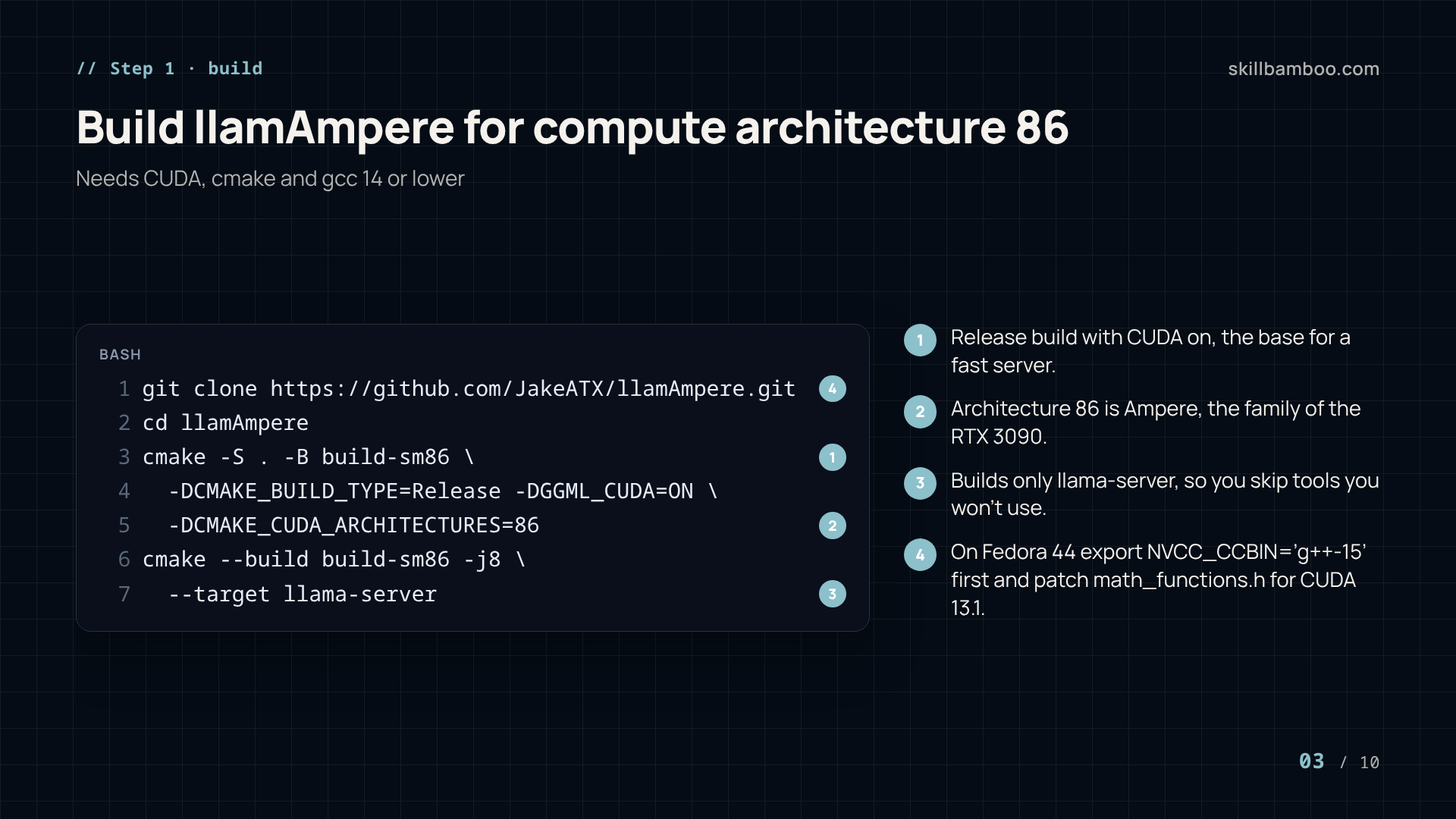
You need a CUDA development toolkit, cmake and a gcc that isn't too new: ideally version 14 or lower. Fedora 44 ships gcc 16, so if you're on that distro, install the gcc15 and gcc15-c++ packages alongside it.
gcc 15 and CUDA 13.1
Compiling with gcc 15 against CUDA 13.1 requires a patch to the CUDA header math_functions.h (under /usr/local/cuda-13.1/targets/x86_64-linux/include/crt/). Without it the build fails before llama-server is produced.
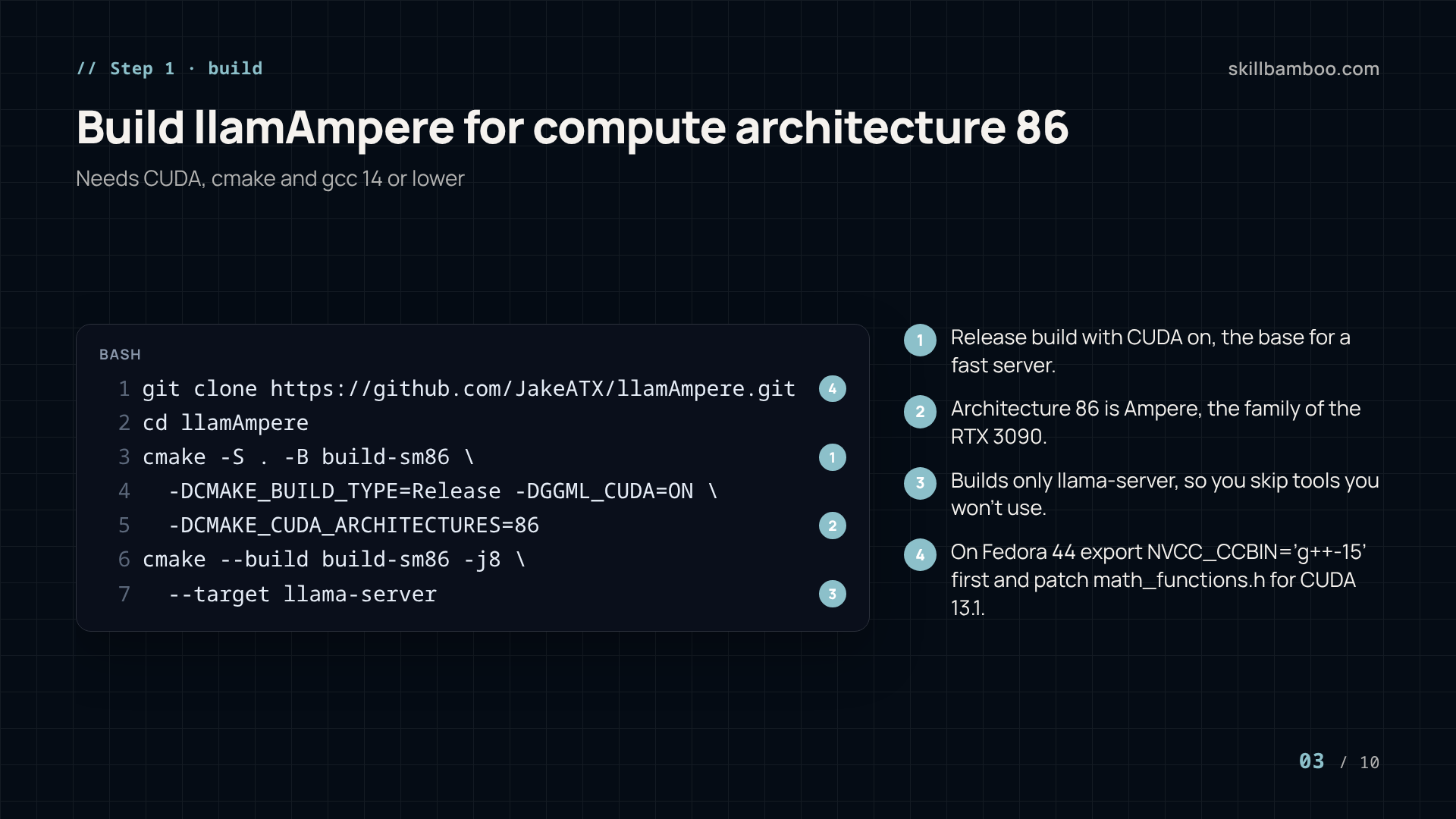
Then clone and build. The first line tells nvcc to use g++ 15, and it's needed only on Fedora 44 (its comment says exactly that). Skip it everywhere else.
export NVCC_CCBIN='g++-15' # Только для fedora-44!
git clone https://github.com/JakeATX/llamAmpere.git
cd llamAmpere
cmake -S . -B build-sm86 -DCMAKE_BUILD_TYPE=Release -DGGML_CUDA=ON -DCMAKE_CUDA_ARCHITECTURES=86
cmake --build build-sm86 -j8 --target llama-server
This is a Release build with CUDA on, compiled for compute architecture 86 (Ampere). It builds only the llama-server target, so you don't wait for tools you won't use. The binary lands in build-sm86/bin/.
Download the 4-bit quant and the fixed chat template
Grab the IQ4_XS GGUF quant of Qwen 3.8 27B (a compressed 4-bit version of the weights) with the Hugging Face CLI. Plan for about 15 GB on disk.
hf download jakeatx/Qwen3.8-27B-ATX-IQ4_XS-M-GGUF --local-dir $HOME/models/qwen3.8-27b-gguf/
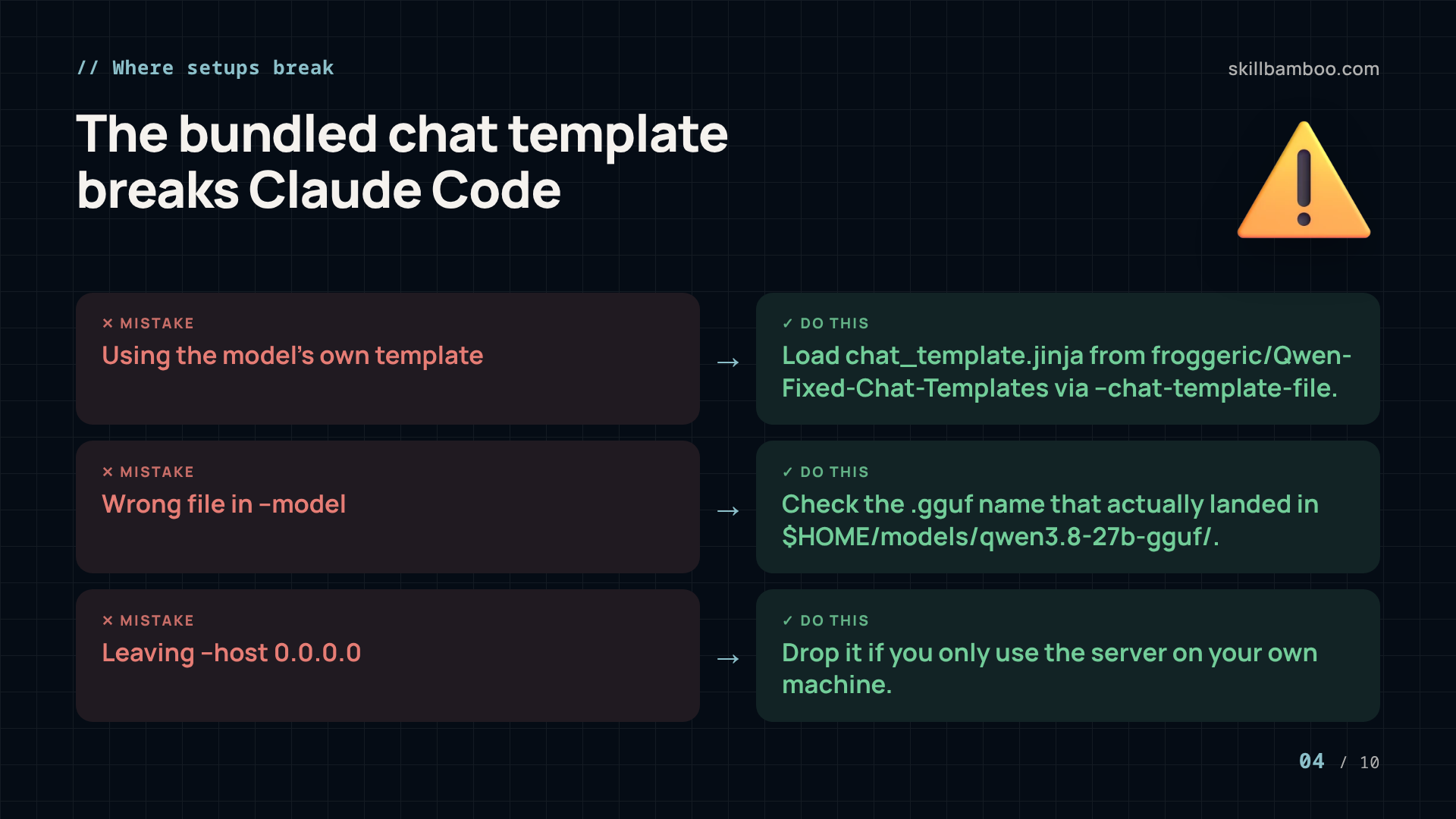
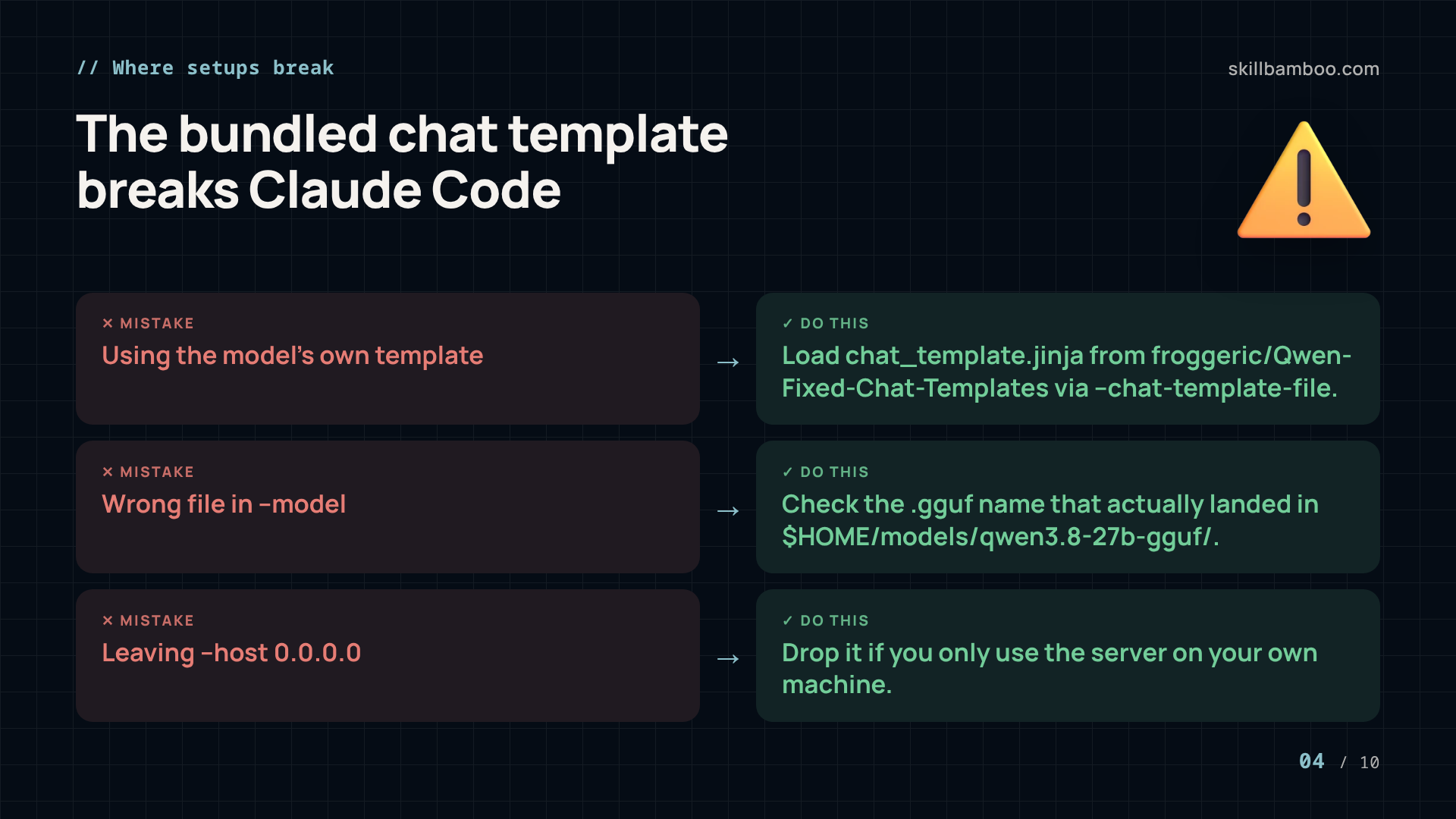
But the second file matters just as much. With the chat template bundled inside the model, Claude Code simply refused to work. Think of the template as the translator between your client and the model: it turns messages and tool calls into the exact text format the model expects. So a broken one breaks the agent even when generation itself is fine.
Use the fixed template
Download chat_template.jinja from the froggeric/Qwen-Fixed-Chat-Templates repository on Hugging Face and save it to $HOME/models/. The launch command below loads it explicitly instead of the bundled one.
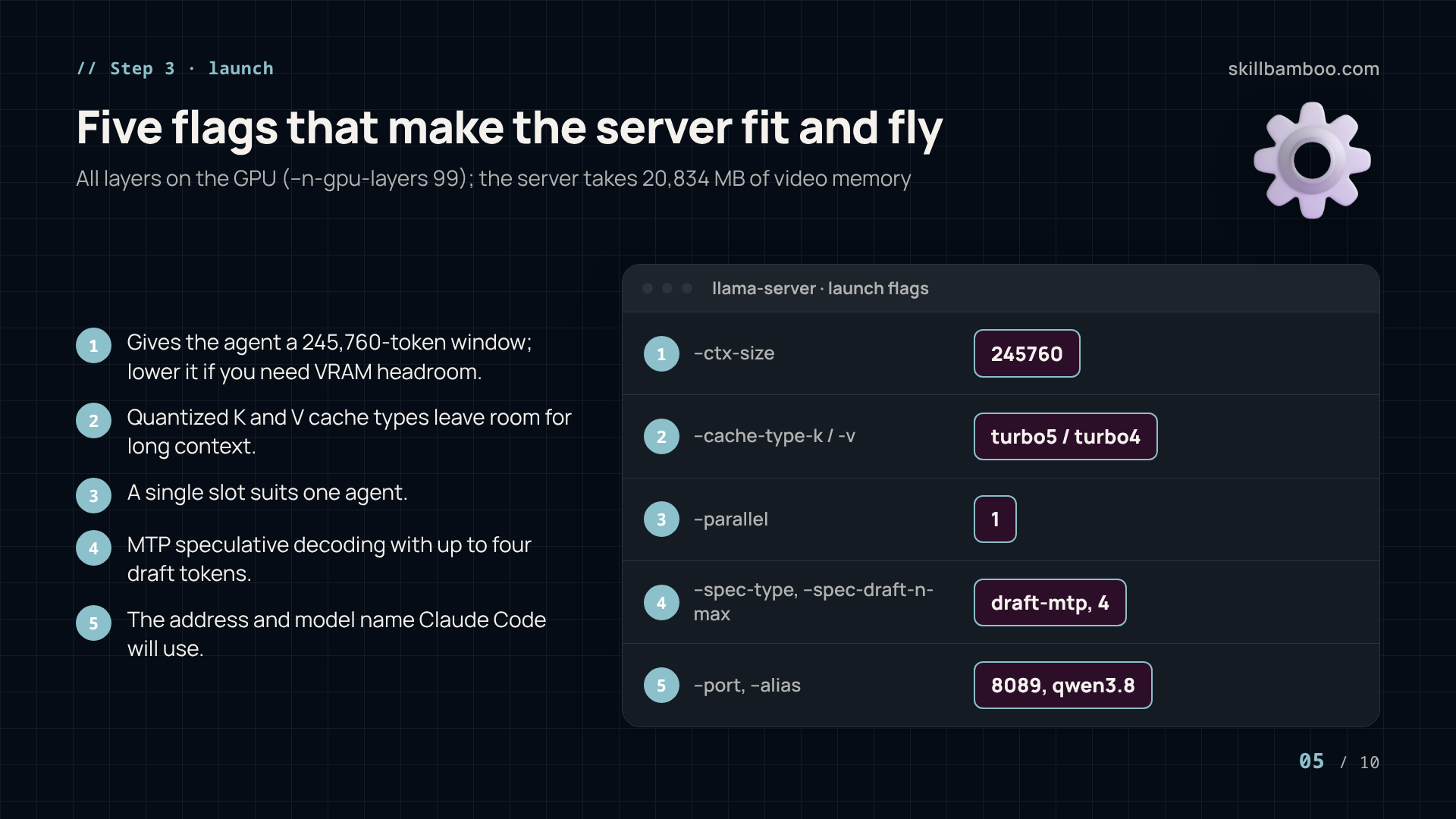
Launch flags: 245K context, quantized KV cache, MTP drafting
Here's the full launch command:
./build-sm86/bin/llama-server \
--ctx-size 245760 \
--batch-size 4096 \
--ubatch-size 1024 \
--threads 8 \
--threads-batch 8 \
--n-gpu-layers 99 \
--flash-attn on \
--cache-type-k turbo5 \
--cache-type-v turbo4 \
--parallel 1 \
--jinja \
--spec-type draft-mtp \
--spec-draft-n-max 4 \
--spec-draft-p-min 0 \
--spec-draft-vocab-map auto \
--model $HOME/models/qwen3.8-27b-gguf/Qwen3.8-27B-ATX-4-XS.gguf \
--chat-template-file $HOME/models/chat_template.jinja \
--host 0.0.0.0 \
--port 8089 \
--alias qwen3.8 \
--reasoning-format deepseek
What the key flags do:
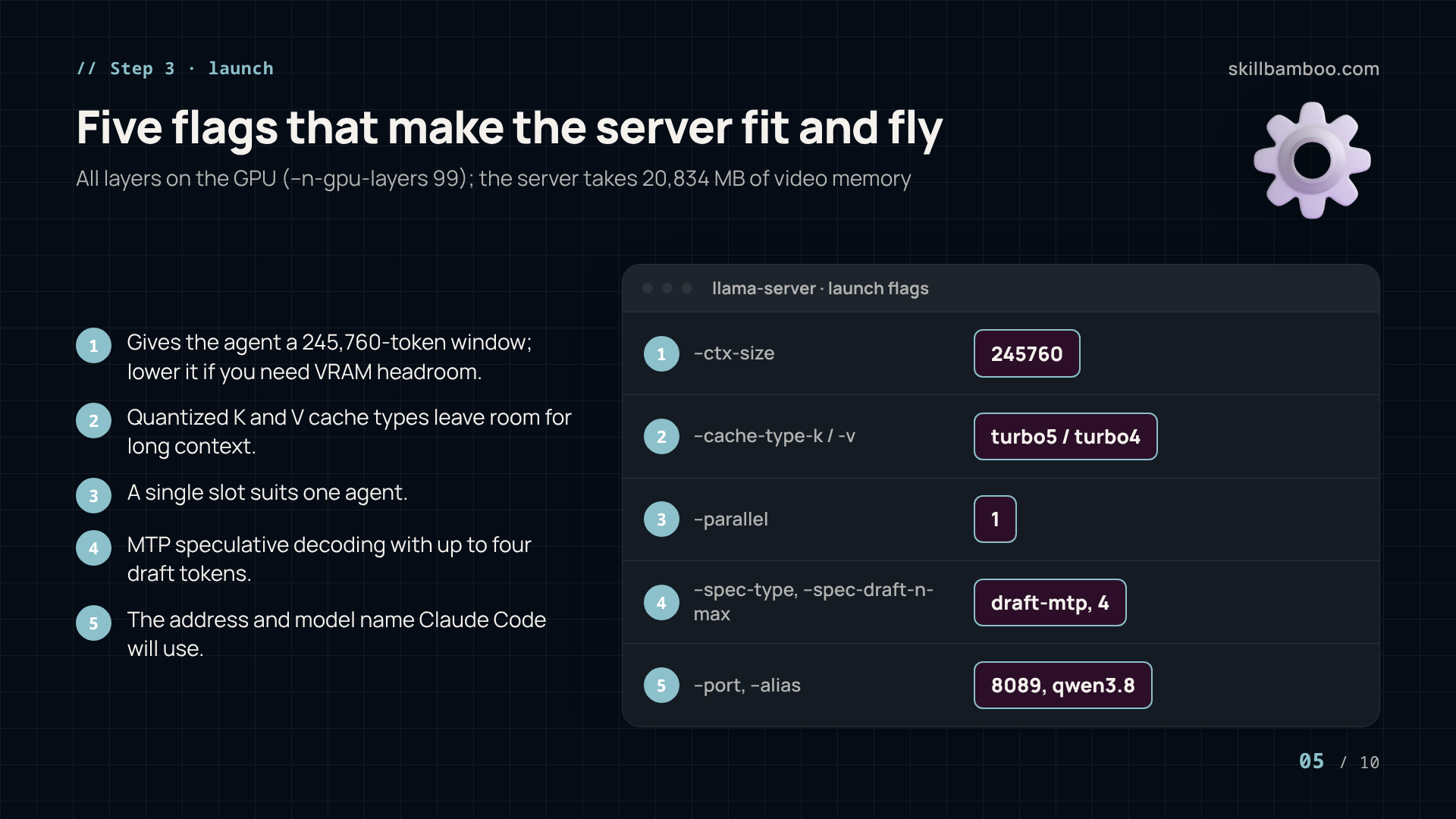
--ctx-size 245760gives the agent a 245,760-token window.--n-gpu-layers 99puts every layer on the GPU, and--flash-attn onenables flash attention.--cache-type-k turbo5and--cache-type-v turbo4set quantized types for the K and V halves of the cache.--parallel 1serves a single slot, which suits one agent.--spec-type draft-mtpwith--spec-draft-n-max 4turns on MTP speculative decoding with up to four draft tokens.--chat-template-fileloads the fixed template, and--alias qwen3.8is the model name clients will use on port 8089.
Just make sure --model points at the .gguf file that actually landed in your download folder. And if you only use the server on your own machine, drop --host 0.0.0.0 from the command.
With these settings the server takes 20,834 MB of video memory. That number is mostly about context: the KV cache sits in GPU memory right next to the weights, so whatever VRAM the model leaves free is your cache budget. If your desktop also renders on this card, or you want headroom for other apps, just lower --ctx-size.
Point Claude Code at your local model server
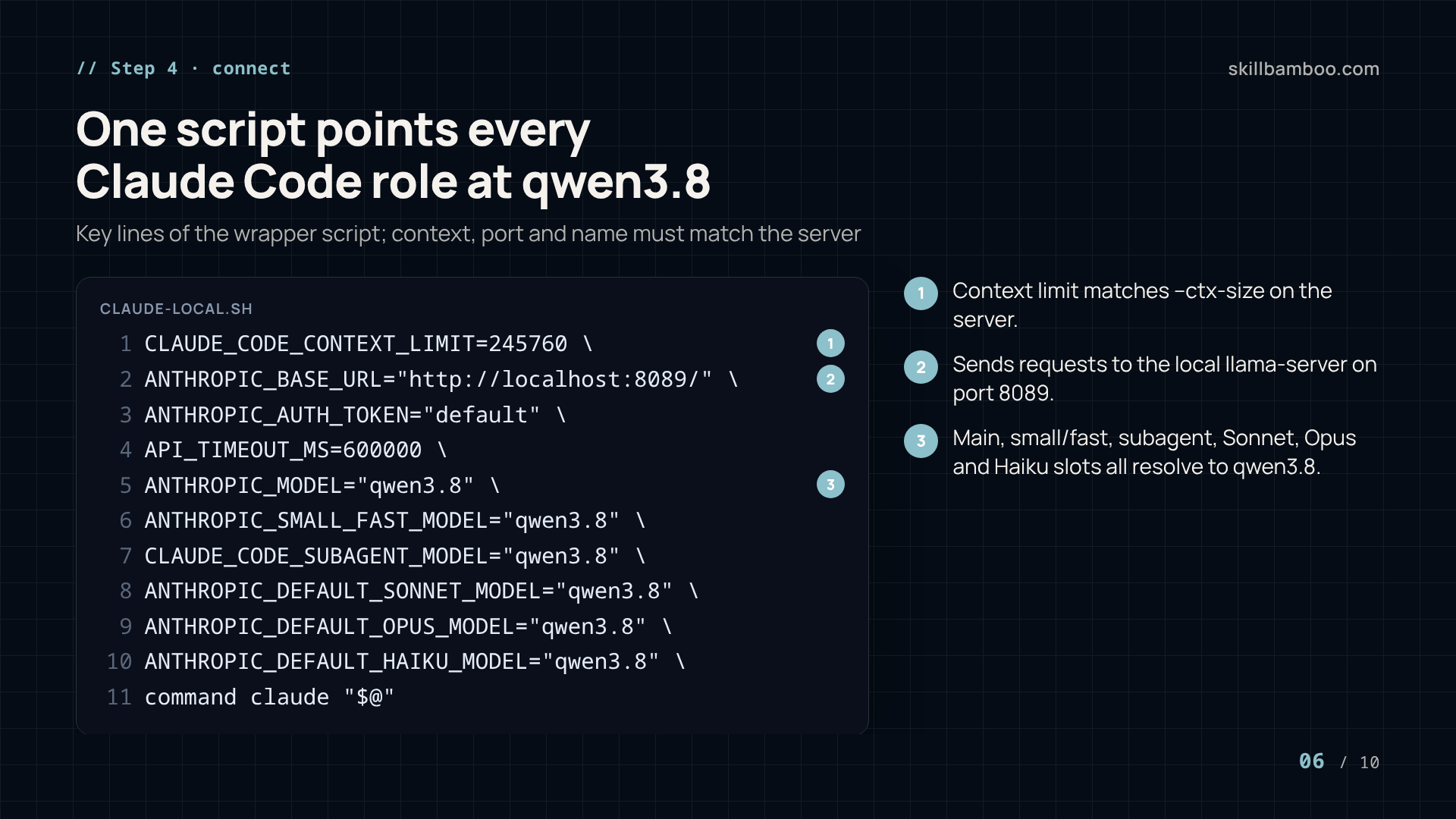
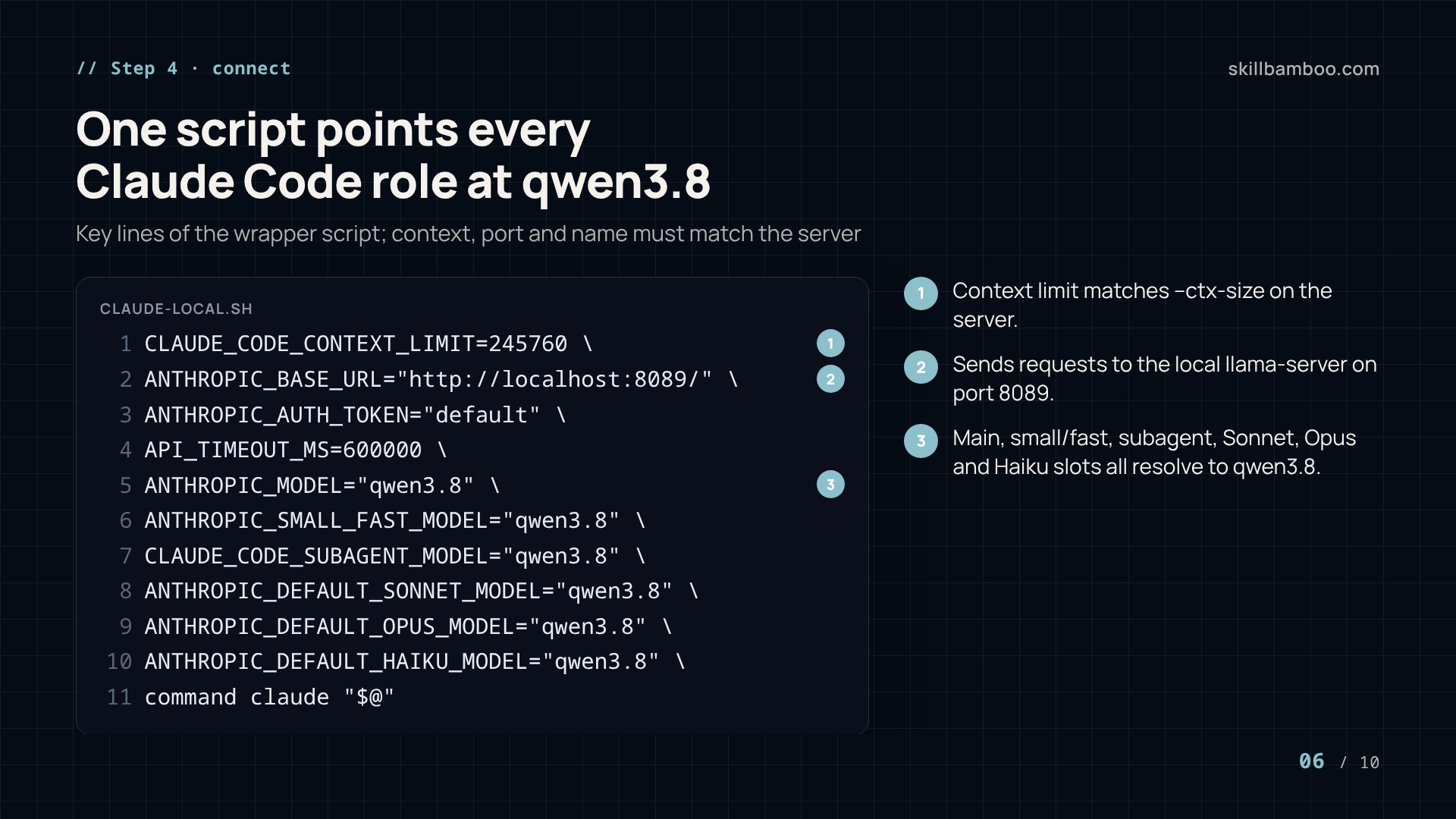
A small wrapper script sends Claude Code to the local server and maps every model role to the same local model:
CLAUDE_CODE_CONTEXT_LIMIT=245760 \
AI_LOG_ENDPOINT="" \
ANTHROPIC_BASE_URL="http://localhost:8089/" \
ANTHROPIC_AUTH_TOKEN="default" \
ANTHROPIC_CUSTOM_HEADERS="Plugin-Type: claude-code" \
API_TIMEOUT_MS=600000 \
ANTHROPIC_MODEL="qwen3.8" \
ANTHROPIC_SMALL_FAST_MODEL="qwen3.8" \
CLAUDE_CODE_SUBAGENT_MODEL="qwen3.8" \
ANTHROPIC_DEFAULT_SONNET_MODEL="qwen3.8" \
ANTHROPIC_DEFAULT_OPUS_MODEL="qwen3.8" \
ANTHROPIC_DEFAULT_HAIKU_MODEL="qwen3.8" \
CLAUDE_CODE_DISABLE_NONESSENTIAL_TRAFFIC=1 \
CLAUDE_CODE_LOG_LEVEL=debug \
ENABLE_LSP_TOOL=1 \
command claude "$@"
Save it as an executable script and run it instead of claude. The main model, the small/fast model, subagents and the Sonnet, Opus and Haiku slots all resolve to qwen3.8, so nothing silently tries to reach a cloud model. The long API timeout gives slow, long-context turns room to finish.
Keep both sides in sync
If you change the context size, port or alias in the server command, change CLAUDE_CODE_CONTEXT_LIMIT, ANTHROPIC_BASE_URL and the model names here to match.
Why agent sessions slow down, and how the KV cache fixes it
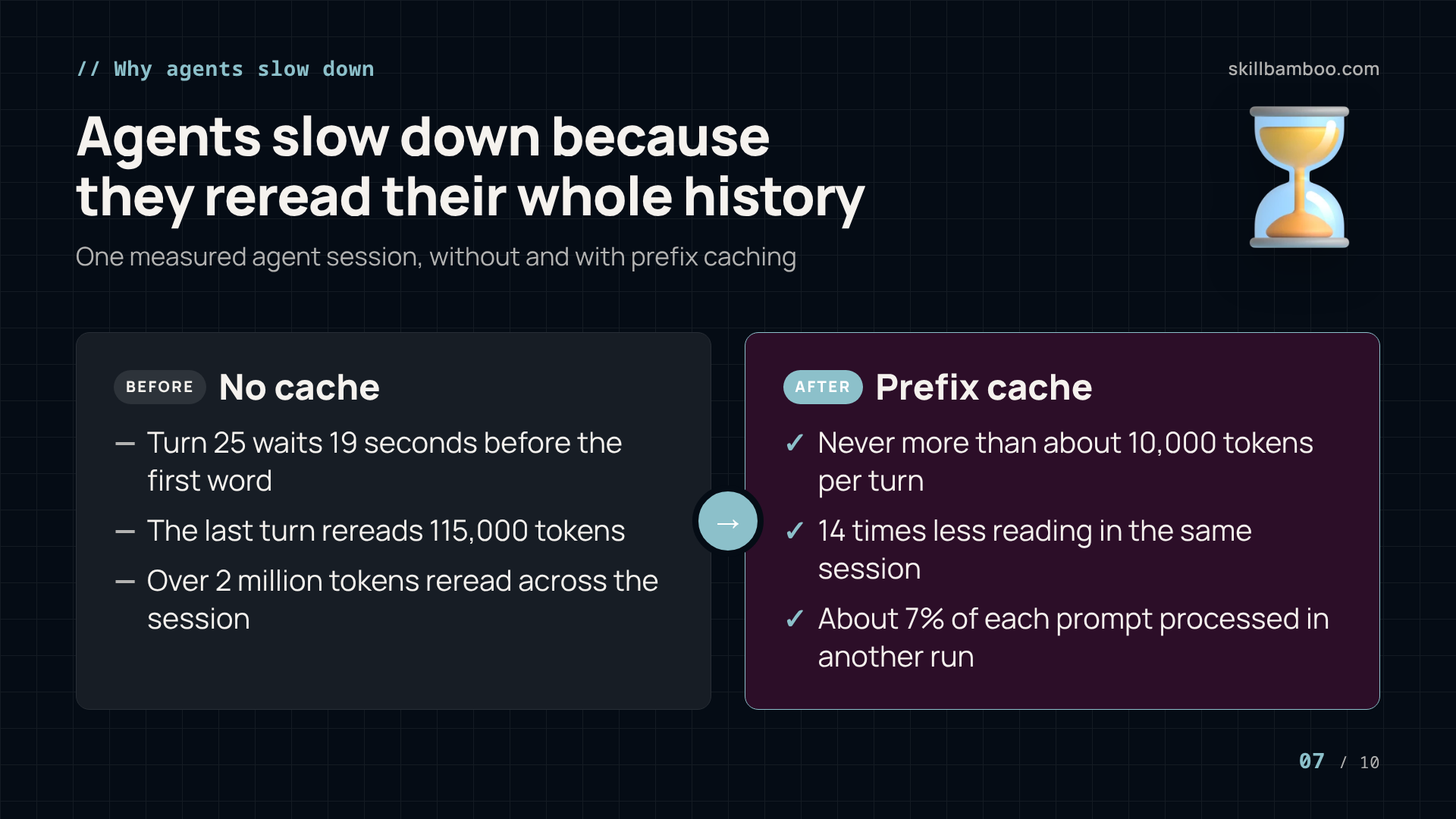
Raw tokens per second is only half the story for agents. In one coding-agent session, turn 25 waited 19 seconds before writing its first word. The model wasn't slower. It just had more to read, because every turn an agent resends the whole conversation – and the history only grows.
While a model reads a prompt, it builds intermediate “notes” on it. That's the KV cache (keys and values). Throw the notes away and every turn starts from scratch. In a measured session without caching, the last turn reread 115,000 tokens, and the session as a whole reread over 2 million.
The good news is that prefix caching fixes most of this. It reuses notes whenever a prompt starts the same way as before, and with it the same session never processed more than about 10,000 tokens per turn: 14 times less reading. In another run, the cached GPU handled only about 7% of each prompt instead of all of it.
The catch is memory. The cache lives in VRAM, and when it fills up, the oldest entries are evicted. Come back to that context and it's processed from scratch again. So the context size in your launch command is a real trade-off, not just a bigger number.
When you outgrow one agent: prefix caching, offload and LMCache
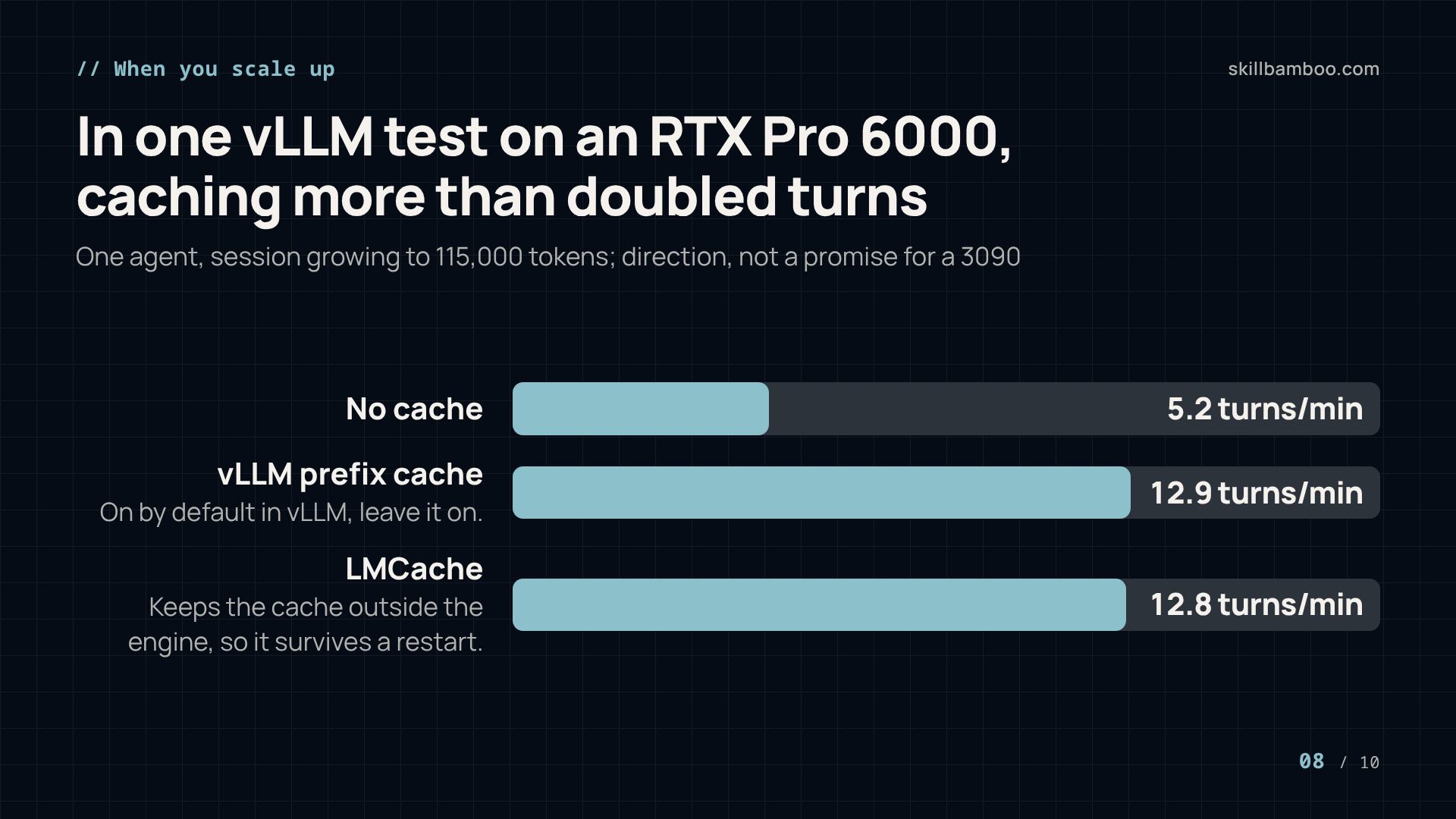
The setup above runs a single slot. But if you later move to several agents on a server engine like vLLM, caching becomes the main lever. The numbers below come from vLLM on an RTX Pro 6000, with an agent session growing to 115,000 tokens. Treat them as direction, not a promise for a 3090 running llama.cpp.
| Measurement (vLLM, RTX Pro 6000) | No cache | vLLM prefix cache | LMCache |
|---|---|---|---|
| One agent, turns per minute | 5.2 | 12.9 | 12.8 |
| First turn after a server restart | not measured | 9.5 s | 1.1 s |
With eight agents sharing one GPU, throughput went from about 8 turns per minute without a cache to almost 60 with caching. On two machines with two different models, caching gave 5.6x more turns per minute on a DGX Spark and 7.5x on an RTX Pro 6000.
Here are the practical rules that follow:
- In vLLM, prefix caching is on by default. Leave it on – if your contexts fit in GPU memory, it's all you need.
- LMCache keeps the cache outside the engine process. That's why it survived a restart while vLLM's in-process cache had to be rebuilt.
- Batching hurts. A cached request grouped with a large uncached one on the same GPU can lose much of its advantage.
vllm.config.cache – vLLM documentation – vLLM prefix caching enabled by default
Key terms
- KV cache – The keys and values a model computes while reading a prompt, kept in memory so already-read context doesn't have to be processed again.
- Prefix caching – Reusing the stored KV cache whenever a new prompt starts exactly the same way as an earlier one, as agent conversations do turn after turn.
- TTFT (time to first token) – The delay between sending a request and receiving the first generated token, dominated by processing the prompt.
- End-to-end tokens per second – Generated tokens divided by total time from sending the request, including the wait for the first token.
- Chat template – The Jinja template that turns chat messages and tool calls into the exact text format the model was trained on.
- LMCache – A cache layer that keeps KV cache in a separate server outside vLLM, in RAM or on NVMe, so it survives engine restarts.
- CPU offload – Letting KV cache that doesn't fit in GPU memory spill over into system RAM instead of being thrown away.
Bottom line: benchmark it yourself and split the work
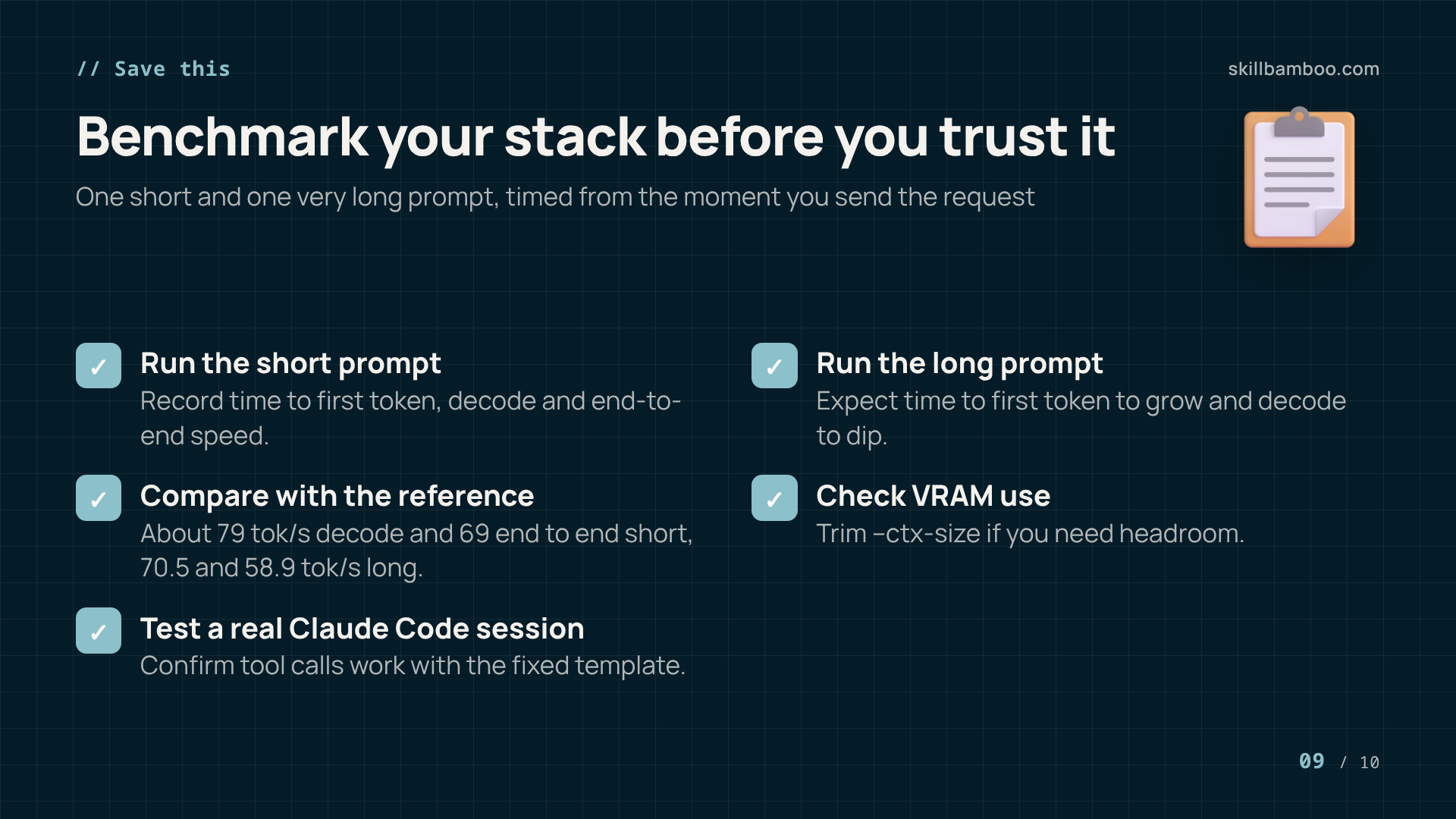
Numbers from someone else's machine are a starting point. Before you trust your stack, test it the same way: one short prompt and one very long prompt, measured from the moment you send the request.
- Run the short prompt and record time to first token, decode speed and end-to-end speed.
- Run the long prompt. Expect time to first token to grow and decode to dip.
- Compare against the reference: about 79 tok/s decode and 69 tok/s end to end short, 70.5 and 58.9 tok/s long.
- Check VRAM use and trim
--ctx-sizeif you need headroom. - Open a real Claude Code session and confirm tool calls work with the fixed template.
Be realistic about what the model is. It handles real coding work locally, but it isn't as smart as Opus. So it's worth splitting the work: have a stronger model draft the plan, then hand implementation and debugging to the local “junior.”
Summary
You now have llamAmpere built for Ampere, Qwen 3.8 27B loaded with a working chat template and a 245K context, and Claude Code running entirely on your RTX 3090. Benchmark it with a short and a long prompt to confirm you're near 70 tok/s. If sessions grow, watch the KV cache – and if you scale to several agents on a server engine, keep prefix caching on.
Check yourself
1. Your local agent answers its first turn instantly, but by turn 25 it waits many seconds before writing anything. What is the most likely cause?
- A. The GPU is thermally throttling after several minutes
- B. The model's decode speed drops as it writes longer answers
- C. The model is reprocessing the entire, ever-growing conversation on each turn because the KV cache isn't being reused
Show answer
Answer: C. Each turn adds history; without cache reuse the whole prompt is reread, so time to first token keeps climbing.
2. Claude Code connects to your llama-server but tool calls fail and the agent misbehaves. The model and flags match the guide. What should you check first?
- A. Whether the server is using the fixed chat template file instead of the one bundled with the model
- B. Whether you downloaded the FP8 version instead of the 4-bit quant
- C. Whether the batch size is large enough
Show answer
Answer: A. The bundled template did not work with Claude Code; the fix is loading a corrected chat_template.jinja via --chat-template-file.
3. You run the guide's launch command but your desktop also renders on the same RTX 3090 and you hit out-of-memory errors. What's the sensible fix?
- A. Increase --parallel to 2
- B. Remove --flash-attn on
- C. Raise --n-gpu-layers above 99
- D. Lower --ctx-size and update the context limit in the Claude Code script to match
Show answer
Answer: D. The KV cache for the context takes VRAM next to the weights; a smaller context frees memory, and the client limit must match the server.
4. You plan to run eight agents against one GPU with vLLM, and all their contexts fit in GPU memory. What caching setup do you need?
- A. LMCache with an NVMe tier, always
- B. Disable caching so agents don't share memory
- C. vLLM's built-in prefix caching, which is on by default
Show answer
Answer: C. If everything fits in GPU memory, the default prefix cache is enough; extra layers add complexity without gain.
5. Which reading of a benchmark row like 'TTFT 5.00 s | decode 70.5 tok/s | e2e 58.9 tok/s' is correct?
- A. Decode speed excludes the wait before the first token; end-to-end speed includes it, so it is lower
- B. TTFT measures how long the model takes to finish the answer
- C. End-to-end speed is always the higher number because it averages several runs
Show answer
Answer: A. e2e is measured from sending the request, so prompt processing time (TTFT) pulls the effective rate down.